Working with Jobs
What’s a Job?
By opposite to a service which is a long running application, a Job is an application that runs to completion.
TOSCA life-cycle (install -> configure -> start ……. then finally stop -> delete) was designed to handle services. There is no concept of Jobs life-cycle within normative TOSCA.
But, as per our experience in HPC and emerging container scheduling within Container as a Service solutions like Kubernetes, we are convinced that supporting Job scheduling is fundamental for any orchestration solution.
So we decided in collaboration with the Alien4Cloud team to extend TOSCA to support Jobs!
Extending TOSCA to support Jobs
First was the life-cycle! In TOSCA the core concept is the life-cycle. So, based on our experience we defined a life-cycle for Jobs.
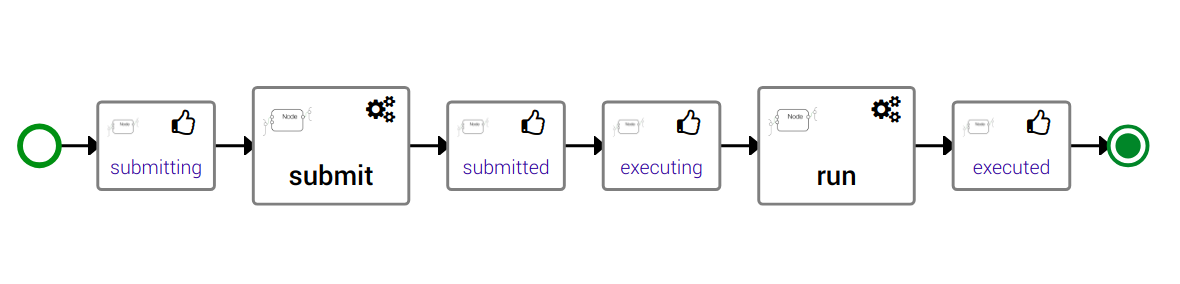
Translated in TOSCA, we defined a new interface
tosca.interfaces.node.lifecycle.Runnable this interface defines three
operations:
submit: Submit is this operation that submits a job to a Job Scheduler, generally at the end of thesubmitwe got a job identifierrun: Run is an asynchronous operation that will be called periodically to check the job status.cancel: Cancel allows to cancel a submitted job.
Supported Jobs Schedulers
Slurm
Slurm is an HPC scheduler. Unsurprisingly, it was our first builtin support for Jobs scheduling. Our Slurm support allows to run single jobs and batches made of several jobs.
Kubernetes
Over the years Kubernetes became the de-facto standard of Containers As A Service (CaaS).
Kubernetes has a special builtin Controller for jobs called Jobs - Run to Completion.
The one you want!
Yorc also support Jobs defined in pure-TOSCA. That means that you are able to write using YAML and Python, Shell or Ansible scripts your own interaction with any scheduler.
All you need to do is to provide implementation for at least the submit
operation of the job life-cycle. If you do not provide implementation for
the run operation, your job will run in fire and forget mode, you will
not be able to get information about its completion. Similarly, if you do not
provide an implementation for the cancel operation then your Job will
simply not being cancellable.
To allow Yorc to manage your job properly some conventions:
at the end of the
submitoperation you should export a fact or environment variable namedTOSCA_JOB_IDcontaining the submitted job identifier.Yorc automatically injects this
TOSCA_JOB_IDas an input of therunandcanceloperations.The
runoperation should be designed to be non-blocking and called several times. Its primary role is to check the job status. It should export a fact or environment variable namedTOSCA_JOB_STATUScontaining one of the following values:COMPLETED: meaning that the job is done successfully.FAILED: meaning that the job is done but in error.RUNNING: meaning that the job is still running.QUEUED: meaning that the job is submitted but didn’t started yet.
Internally
RUNNINGandQUEUEDstatuses are handled the same way by Yorc that will recall therunoperation after a delay to refresh the status.The
runoperation can also be used to retrieve logs or perform some cleanup after the job completion.
You can find an example of a pure-TOSCA implementation of jobs in the official CSARs public library with an implementation of a Spark Job
Specific workflows for Jobs
When your application contains Jobs (meaning node templates which implements
the tosca.interfaces.node.lifecycle.Runnable interface) then Alien4Cloud
will automatically generate two workflows:
run: a workflow that submits and monitor jobscancel: a workflow that cancels jobs
Warning
The cancel workflow is a kind of temporary work around. It allows
to cancel jobs but do not take care if the job is submitted or not. The
recommended way to cancel a run workflow is to cancel the associated
task in Yorc using either the CLI or the Rest API.
This is temporary and we will provide soon a way to cancel workflows directly
from Alien4Cloud.
The run workflow allows to orchestrate Jobs. That means that if for
instance, jobB depends on jobA using a TOSCA dependsOn or
connectsTO relationship then Alien4Cloud will generate a workflow that
first submit and wait for the completion of jobA before submitting
jobB.
Jobs cancellation
The proper way to cancel Jobs that were submitted by a TOSCA workflow is
to cancel the associated Yorc Task/Execution of this workflow.
This way Yorc will automatically call cancel operations for nodes that
implement it and which have successfully executed their submit operation.
Currently those automatic cancellation steps do not appear in Alien4Cloud.
We will work soon on making them visible.